Adjustable Stop Orders
Description |
| You can create one-time order adjustments for stop, stop limit, trailing stop and trailing stop limit orders. When you attach an adjusted order, you set a trigger price that triggers a modification of the original (or parent) order, instead of triggering order transmission. Following are examples for Stop, Stop Limit, and Trailing Stop adjusted orders.
Note that you can adjust any of the parent stop order types to any other stop order type; for example if you set up a Stop Limit, you can attach the one-time adjustment to change the order to a Trailing Stop, or if you start with a Stop order the adjustment can change it to a Trailing Stop Limit order.
Adjusted Stop Example
With a basic stop order, imagine you're long 200 shares of stock XYZ at $40.00/share, and have set up a stop loss (a.k.a. the parent order) with a trigger price of $39.50. This means that if the stock drops to $39.50, TWS will submit a market order for 200 shares XYZ. Now let's take the same starting point, and imagine the stock price begins to rise and surpasses $42.00/share. With the adjustable stop order, you attach an adjustable stop with a Trigger Price of $42.00 and an Adjusted Stop Price of $41.50. In this case, if the stock price rises to $42.00 the parent order is modified to a stop loss with a stop trigger price of $41.50 instead of $39.50.
Adjusted Stop Limit Example
Here's the scenario: You're long 200 shares of stock XYZ at $40.00/share, and have set up a stop loss (a.k.a. the parent order) with a trigger price of $39.50. This means that if the stock drops to $39.50, TWS will submit a market order for 200 shares XYZ. The stock price begins to rise. Now you attach an adjustable Stop Limit order with the following values: Trigger Price of $42.00, Adjusted Stop Price of $41.50 and Adjusted Stop Limit Price of $41.40. In this case, if the stock price rises to $42.00, the parent stop order is modified to a Stop Limit order with a stop trigger price of $41.50. When the trigger price is hit, a limit order with a limit price of $41.40 is submitted.
Adjusted Trailing Stop Example
Again, you're long 200 shares of XYZ at $40.00/share and the price seems to be moving upward. You set up a trailing stop order with a stop trigger price of $39.50 and a trailing amount of $.1.00 The price increases to $41.00, your trailing stop moves the trigger price to $40.00. The order trails the price up to $42.50 when prices begin to fall. On the upward movement the trail had moved the stop trigger as high as $41.50; when the dropping price hits this trigger a market order is submitted. You could have set an adjustable trailing stop limit order, with the following parameters: Trigger Price of $42.00, Adjusted Stop Price of $41.50, Adjusted Stop Limit Price of $41.40 and Adjusted Trailing Amount of $.50. Now, when the upward moving price hits the trigger of $42.00, your original trailing stop order is modified to a trailing stop limit with a $.50 trail amount and a limit price of $41.40. If the price were to continue up to $43.00, the trail would set the stop price at $42.50. When the dropping price hits this trigger, a limit order for $41.40 would be submitted.
For US equity and options markets,
stop orders will only be elected by prices posted during normal
NYSE trading hours (9:30 a.m. to 4 p.m. New York Time, Monday
to Friday). In addition for NYSE-listed stock IB SmartRouted
stop orders, the order will not be elected until the NYSE
displays a BBO. |
| |
Exchanges |
| Native: |
Simulated
(by IB): |
| |
IB Smart, AMEX,
ARCA, Belfox, BOX, BRUT, BTRADE, CBOE, CBOT, CFE. CME, DTB, E-CBOT,
EUREX US, FTA, FWB, GLOBEX, HKFE, IBIS, IDEM,
IDEAL PRO, ISE, ISLAND, Liffe, LSE, Matif, ME, Meffrv, Monep,
NYMEX, NYSE, ONE, OSE.JPN, PHLX, PSE, SNFE, Soffex, SuperMontage, SWB, SWX, VIRTX,
TSE, TSE.JPN, TSX, XETRA |
|
| |
|
|
TWS
Links
|
You can modify any orders in the "Stop" family, including stop limit, trailing stop and trailing stop limit orders.
For information on how to adjust stop orders, please refer to
the  |
| |
|
|
| Example |
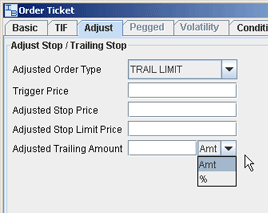
| You can attach adjusted orders using the Order Ticket, or by customizing the fields on your trading window. For the sake of this document, we will focus on the TWS Order Ticket.
The Adjust tab on the order ticket becomes active when your order type is a stop, stop limit, trailing stop or trailing stop limit. Based on the type of Adjusted Order you select, TWS activates the appropriate fields. If you adjust to a stop order, the Trigger Price and Adjusted Stop Price fields become active. |
|
 |
| |
|
|
| |
|
|
Back
|
|