| Description |
| Bracket
orders are designed to help limit your loss and help lock
in a profit
by "bracketing" any order with two opposite-side
orders. A BUY order is bracketed by a high-side sell limit
order and a low-side sell stop order. A SELL order is bracketed
by a high-side buy stop order and a low side buy limit order.
The order quantity for the
high and low side bracket orders is the same of the quantity
of
the original order. By default, the amount off the current
price to which a bracket order is set is 1.0. This offset
amount can be manually changed on the order management line
for a specific order or you can modify the default offset
amount using the Default Order Settings box. |
| |
|
Exchanges |
| Native: |
Simulated
(by IB): |
| |
IB Smart, AMEX,
ARCA, BOX, BRUT, BTRADE, INet, SuperMontage, NYSE |
|
| |
|
|
| TWS
Links
|
For
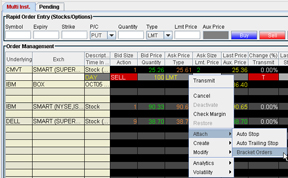
information on how to create bracket orders, please refer to
the  |
| |
|
|
|
Example |
You
create an order to buy 100 shares of XYZ at $50.00/share and
then elect to Attach Bracket Orders. TWS creates
both a sell limit order for $51.00, and a sell stop order
for $49.00 of the same quantity as the original order. When
the original (or "parent") order executes, the two bracket orders are automatically transmitted. |
|
 |
| |
|
|
| Note: Any
stock or option symbols displayed are for illustrative purposes
only
and are not intended to portray a recommendation. |