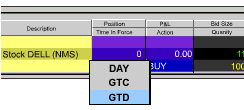
Good 'Til Date/Time (GTD) Orders
Description |
| GTD
(good 'til date) is a time in force that lets you select an
expiration date and time through which a submitted order will
remain active. To use, select GTD as the time in force. Two
new fields, "Exp. Date" and "Time" will
appear next to the Time in Force field. Set the good 'til
date using the format YYYYMMDD. Set the Time using the format
HH:MM:SS. To use a time zone other than your local zone, enter
the time zone abbreviation following the date. Use EST for
Eastern Standard Time, PST for Pacific Standard Time, and
GMT for Greenwich Mean Time. |
| |
Exchanges |
| Native: |
Simulated
(by IB): |
| HKFE, IBIS, TSE, |
IB Smart, AMEX,
ARCA, Belfox, BOX, BRUT, BTRADE, CBOE, CBOT, CFE, CME,
DTB, E-CBOT, EUREX US, FTA, GLOBEX, HKFE, IBIS, IDEALPRO,
IDEM,
ISE, ISLAND, Liffe, LSE, Matif, ME, Meffrv, Monep, NYMEX,
NYSE, ONE, OSE.JPN, PHLX, PSE, SGX, SNFE, Soffex, SuperMontage,
SWX, TSE, TSE.JPN, VIRTX, XETRA |
|
| |
|
|
TWS
Links
|
For
information on how to create hidden orders, please refer to
the  |
| |
|
|
| Example |
| You
can define any order type as good 'til date/time
using the GTD time in force. This ensures that your order
will remain active within the IB system up until
the close of
market on the date you specify, or if you also specify a
time, up until the date and time you specify. When you create
an
order, select GTD from the Time in Force field. In the Exp.
Date field that displays, you enter the date through
which you want the order to work. If desired, you can also
enter a specific time in the Exp. Time field. |
|
|
| |
| Note:
Any stock or option symbols displayed are for illustrative
purposes only and are not intended to portray a recommendation. |
Back
|
|