Taifook Securities Group Limited
Securities Futures Forex & Bullion Research eServices Customer Services About Us
Welcome to www.taifook.com Home 繁體版 簡體版 日本語

Product Highlights  |  Exchanges by Product  |  Order Types  |  Fees & Charges  |  Other Fees  |  Market Data  | 
  | Interest and Margin Rate  |  Account Minimums  |  Futures Delivery  |  Margin Overview  |  Margin (Intraday)  | 
  | Account Activation / Password Change  |  Trading Calendar  |  Statement interpretation  |  Demo  |  FAQs  | 


Hidden Orders

Description

A Hidden order allows you to submit an order (generally a large volume order) without publicly disclosing the order information.

 
Exchanges
Native: Simulated (by IB):
INet AMEX, ARCA, BRUT, BTRADE, Belfox, BondDesk, BOX, CBOE, CBOT, CFE, CME, DTB, E-CBOT, EUREXUS, FTA, FWB, GLOBEX, HKFE, IBIS, IDEAL PRO, IDEM, ISE, Liffe, LSE, Matif, ME, Meffrv, Monep, NYMEX, NYSE, ONE, OSE.JPN, PHLX, PSE, SGX, SNFE, SuperMontage, Soffex, SWB, SWX, TMBR,TSE, TSE.JPN, TSX, VIRTX, WINNER, XETRA
     
TWS Links
For information on how to create hidden orders, please refer to the
     

Example

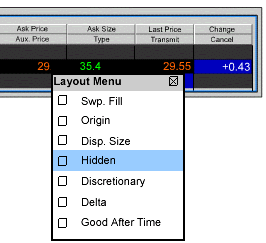
You want to buy 5000 shares of XYZ but don’t want your order to be seen by other traders in the market. You create a limit order to buy 5000 shares. From the TWS Page menu you select Layout, and in the Columns – Order Row section you scroll down to the Hidden entry and check it. Back on the trading screen you select INet in the Destination field, and check the box in the Hidden field. Transmit the order. Your order is submitted but evidence of the order is hidden from the market data and INet deep book.


Back


Copyright © 2006 Taifook Securities Group Limited. All Rights Reserved.
Best viewed with Internet Explorer 6.0 or above version only


Listed Company General Meeting Notice Board