Iceberg
orders allow you to submit an order (generally a large volume
order) while publicly disclosing only a portion of the submitted
order.
Exchanges
Native:
Simulated
(by IB):
AEB, BTRADE, IBIS, SBF, TSE,
TSE.JPN, VIRTX
IB Smart, AMEX, BOX, CBOE, E-CBOT,
CFE, Eurex US, GLOBEX, ISE, IDEM, Nymex, Montreal Exchange, PSE, PHLX
TWS
Links
For
information on how to create iceberg orders, please refer to
the
Example
You
want to buy 5000 shares of XYZ stock but only want to show
a buy order of 200 shares. You create a limit order to buy
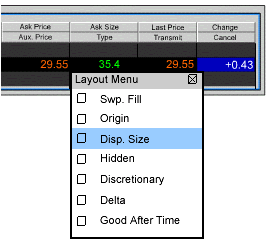
5000 shares of stock XYZ. From the TWS Page menu you select
Layout, and in the Columns – Order Row section you scroll
down to the Disp. Size entry and check it. Back on the trading
screen you select Smart in the Destination field, and enter
200 in the Disp. Size field. Transmit the order. Your order
is submitted, but it is displayed as a buy order for 200 shares
of XYZ.