Limit Orders
Description |
|
A
Limit order is an order to buy or sell a contract at a specified
price. Use of a Limit order helps ensure that the customer
will
not receive an execution at a price less favorable than the
limit price. Use of a Limit order, however, does not guarantee
an execution.
Because Supersoes, Soes, and Selectnet do not accept non-marketable
limit orders, non-marketable limit orders that are routed
to these destinations will be rejected.
|
| |
Exchanges |
| Native: |
Simulated
(by IB): |
| AMEX, ARCA, BRUT, BTRADE,
Belfox, BondDesk, BOX, CBOE, CBOT, CFE, CME, DTB, E-CBOT,
EUREXUS, FTA, FWB, GLOBEX, HKFE, IBIS, IDEALPRO, IDEM,
Inet, ISE, Liffe, LSE, Matif, ME, Meffrv, Monep, NYMEX,
NYSE, ONE, OSE.JPN, PHLX, PSE, SGX, SNFE, SuperMontage,
Soffex, SWB, SWX, TMBR,TSE, TSE.JPN, TSX, VIRTX, WINNER,
XETRA |
|
|
| |
|
|
TWS
Links
|
For information on how to create Limit orders, please refer to
the  |
| |
|
|
| Example |
| Stock
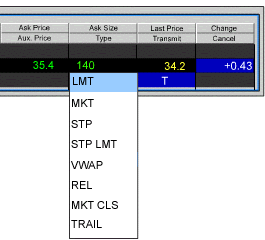
XYZ shows an asking price of 24.50. You decide to buy 100
shares, but you don’t want to pay more than 24.35. You
click the Ask price to create a BUY order, and select LMT
in the Type field to specify a limit order. In the Lmt. Price
field, you enter your limit price of 24.35 and submit the
order. Your order will only execute at 24.35 or better. If
nobody is willing to sell for that price, your order will
not execute. |
|
 |
| |
|
|
Back
|
|