| You
want to buy some tech stock at the best possible price, but
you only want 100 shares. You could buy 100 shares of YXX at 25.00/share, XYZ at 19.50/share, or YZZ at 21.40, but
you don’t want more than 100 shares total. On the Page
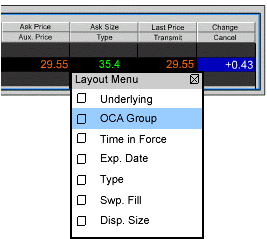
menu you select Layout, and in the Columns – Order Row
section you check the OCA Group box. On the
trading screen you click the Ask price and create a buy limit
order for YXX at 25.00, and in the OCA Group
field you type in “Tech.” You then create two
more limit orders, one for XYZ and one for YZZ at the above
stated limit prices, and in the OCA Group box you enter the
same name, “Tech,” for each of these orders. You
have created a one-cancels-all (OCA) group. If one of the
orders executes, the other two orders are automatically cancelled.
If one of the orders partially executes, the quantity of each
of the other orders is reduced proportionately. If an order
in the group is cancelled, the remaining orders are also canceled. |