Stop Orders
Description |
| A
Stop order becomes a market order to buy or sell securities
or commodities once the specified stop price is attained
or
penetrated. A Stop order is not guaranteed a specific execution
price and may execute significantly away from its stop price.
A Sell Stop order is always placed below the current market
price of the security or commodity. It is typically used
to
limit a loss or protect a profit on a long stock position.
A Buy Stop order is always placed above the current market
price. It is typically used to limit a loss or help protect
a profit
on a short sale. Some exchanges natively accept and process
Stop orders according to the standard industry definition
of the term. For those exchanges that do not natively execute
stop orders, IB simulates such stop orders with the following
default triggers:
Sell Simulated Stop Orders become
market orders when the last traded price is less than or equal
to the stop price. Additional sell stop order protection is
provided for NASDAQ stocks and US Equity Options which are
only triggered after two offer prices are less than or equal
to the stop price.
Buy Simulated Stop Orders become
market orders when the last traded price is greater than or equal
to the stop price. Additional buy stop order protection is
provided for NASDAQ stocks and US Equity Options which are
only triggered after two bid prices are greater than or equal
to the stop price.
For US equity and options markets,
stop orders will only be elected by prices posted during normal
NYSE trading hours (9:30 a.m. to 4 p.m. New York Time, Monday
to Friday). In addition for NYSE listed stock IB SmartRouted
stop orders, the order will not be elected until the NYSE
displays a BBO. |
| |
Exchanges |
| Native: |
Simulated
(by IB): |
| CBOT, CFE, CME, DTB, E-CBOT,
EUREX US, FWB, IBIS, IDEM, ISE, Soffex, SWB, SWX, VIRTX |
IB Smart, AMEX,
ARCA, Belfox, BOX, BRUT, BTRADE, CBOE, FTA, GLOBEX, HKFE,
IDEALPRO, ISLAND, Liffe, LSE, Matif, ME, Meffrv, Monep,
NYMEX, NYSE, ONE, OSE.JPN, PHLX, PSE, SNFE, SuperMontage,
TSE, TSE.JPN, TSX, XETRA |
|
| |
|
|
TWS
Links
|
Custom
Stop order triggers may also be specified to override the default
triggers. See the Trigger Method topic in the TWS User's Guide for more information.
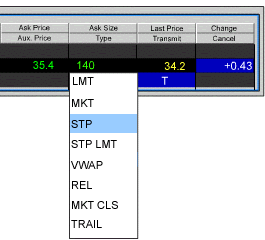
For information on how to create Stop orders, please refer to
the  |
| |
|
|
| Example |
| You
have purchased 100 shares of XYZ for $50.00/share. You want
to limit possible loss on this stock, so you create a stop
order to sell 100 shares of XYZ with the stop price set to
$46.00. If the price of your stock falls to $46.00 or below,
your stop order is activated and a sell market order for 100
shares XYZ is transmitted. |
|
 |
| |
|
|
| For
special notes and details on U.S. Futures Stop and Stop-limit
orders, click here. Native stop orders sent to IDEM are only filled up
to the quantity available at the exchange. Any unfilled stop
order quantity will be Cancelled. |
Back
|
|