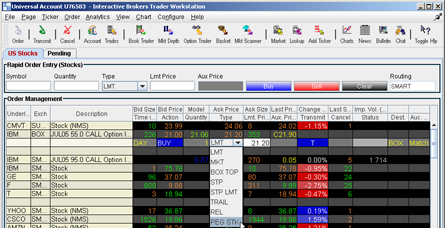
To enter
these price improvement orders into the TWS you must direct
your auction orders to BOX and make use of up to 7 fields;
Order Type, Limit Price, Price Aux, Auction Strategy, Delta,
Stock Reference Price, and Stock Range (High & Low). You
may enter these fields through the trading window or from
the Order ticket.
To enter a limit order, select limit order, enter a limit
price and choose an auction strategy. As an example, if the
market was $2-2.10 and you wanted to enter a buy limit order
at $1.97 in a transparent auction you would enter:
| Order Type: |
Limit |
| Limit Price: |
1.97 |
| Aux Price: |
N/A |
Auction Strategy: |
Transparent |
If the bid on BOX moves to $1.95, and if an auction were
to start, you would immediately bid $1.97 in the auction.
To enter a relative order, select relative order enter an
offset and choose an auction strategy. For example, if the
market was $2-2.10 and you wanted to enter a sell relative
order with a $.04 offset in a Discretionary-Improving auction,
you would enter:
| Order Type: |
Relative |
| Limit Price: |
N/A (Optional) |
| Aux Price: |
.04 (Offset) |
Auction Strategy: |
Improving |
If the listed offer moved to $2.05, and if an auction were
to start and the first auction offer was $2.04, your auction
offer would then be $2.03. Your auction price would continue
to improve the auction by $.01 until you reached $2.01.
|