OCO Order Example:
OCO order includes Limit Order and Stop Loss Order at the same time. OCO order can help you to achieve your profit target, at the same time, reduce the risk of loss due to opposite market trend. If the limit order of OCO order is executed, the stop loss order will be cancelled. Conversely, if the stop loss order is executed, the limit order will be cancelled.
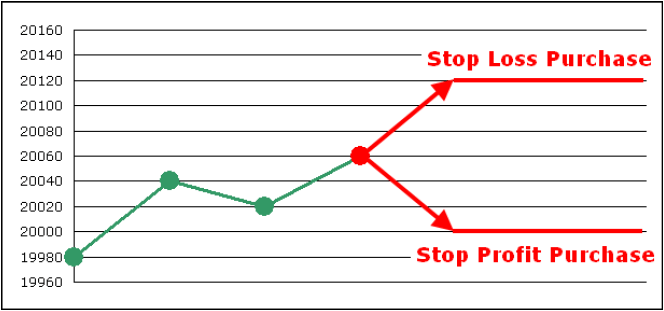
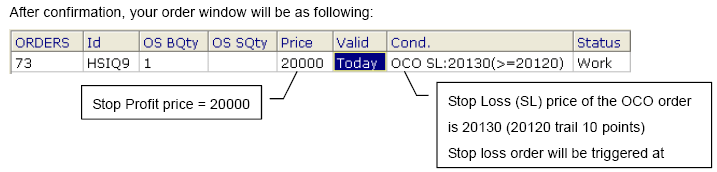
Supposed we have opened a position by selling a HSI futures contract at 20060. We will close the position at the target level 20000 to ensure 60 points profit. At the same time, we want to limit our loss for 60 points at the level 20120. If the market price rises to 20120, the stop loss order will be triggered and trailing 10 points. And the limit order at 20000 will be cancelled by the system.
Steps for placing an OCO order:
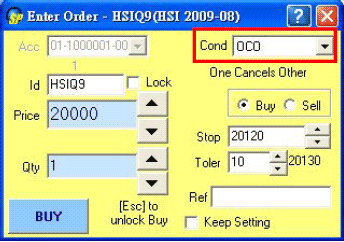
- Choose "OCO" in "Cond" (condition)
- Choose Buy/Sell (Buy)
- Fill "Price" (Stop Profit) (18000)
- Fill "Qty" (Quantity) (1)
- Fill "Stop" (Stop Loss) (18120)
- Fill "Toler" (10)
- Press "Buy" to confirm your order.
[ Back ]
|